Chevrolet Captiva Service & Repair Manual: Stabilizer Bar R&R
Front
| 1. |
Remove engine splash shield. |
| 2. |
Separate steering linkage outer tie
rod on lefthand side at steering knuckle, Fig. 1. |
| 3. |
Separate front stabilizer shaft link
at front stabilizer shaft, Fig. 1. |
| 4. |
Remove front stabilizer shaft insulator
at front stabilizer shaft, Fig. 1. |
| 5. |
Remove front stabilizer shaft through
lefthand wheel opening, Fig. 1. |
| 6. |
Reverse procedure to install. |
|
Rear
| In following service procedure,
it is not required to remove rear suspension support. Lower support enough
to remove stabilizer bar. |
| Hold ball shaft secure with a
90° bend style TORX® bit, when removing nut. |
| 1. |
Raise and support vehicle. |
| 2. |
Lower rear suspension support. |
| 3. |
Remove stabilizer link to stabilizer
shaft nut, Fig. 2. |
| 4. |
Remove stabilizer shaft clamp bolts,
Fig. 3. |
| 5. |
Remove stabilizer shaft clamps and
bushings from stabilizer shaft, Fig. 3. |
| 6. |
Disengage stabilizer shaft from stabilizer
link ball studs, while removing stabilizer shaft from vehicle. |
| 7. |
Reverse procedure to install, noting
following: |
| |
a. |
Torque stabilizer shaft clamp
bolts to 52 ft. lbs. |
| |
b. |
Torque stabilizer link nut to
37 ft. lbs. |
|
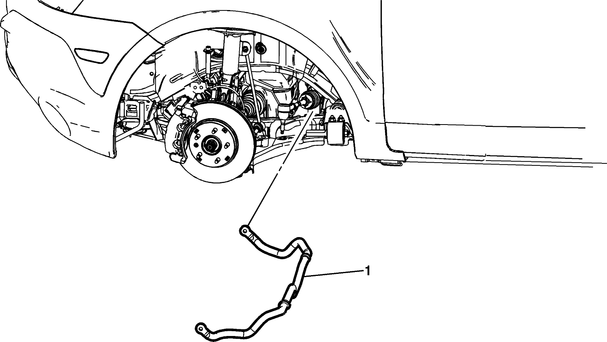
Fig.
1
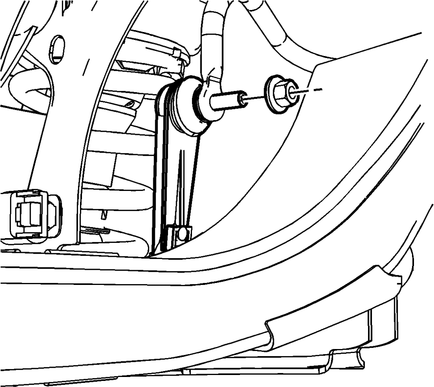
Fig.
2
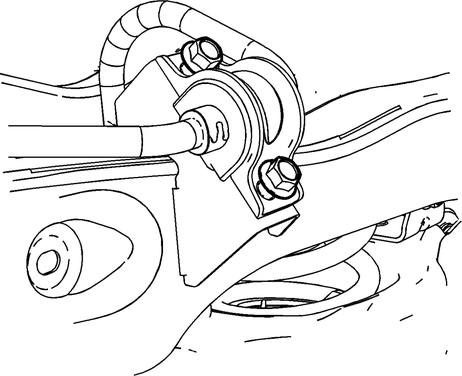
Fig.
3
Front
Use proper size Allen wrench to
keep front stabilizer shaft link ball stud from rotating while removing
or installing front stabilizer shaft link nut.
...
Front
1.
Remove front wheel bearing and hub
assembly.
2.
Separate steering linkage outer tie
rod at steering knuckle.
...

 Stabilizer Bar Link Kit R&R
 Steering Knuckle R&R