
Chevrolet Captiva Service & Repair Manual: HVAC Blower Motor R&R
|
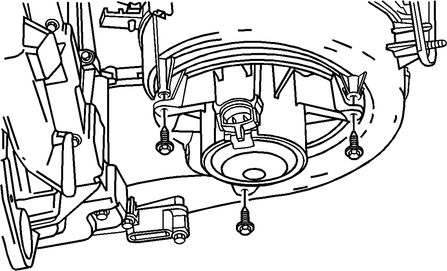
Fig. 1
Removing the HVAC blower motor in a Chevrolet Captiva 2013 involves a systematic approach to accessing and replacing the component. Typically located behind the dashboard on the passenger side, the blower motor is vital for circulating air within the vehicle's interior for heating, ventilation, and air conditioning functions. To begin, preparations such as parking the vehicle on a level surface, turning off the engine, and disconnecting the battery are essential safety measures.
The removal process entails accessing the blower motor by removing panels or compartments that provide access to the HVAC system. This step may involve disconnecting electrical connections powering the motor and carefully extracting mounting screws or bolts that secure it in place. Special attention should be given to avoid damaging surrounding components during this procedure. Once the motor is extracted, a thorough inspection is conducted to assess its condition for any signs of damage or wear. If necessary, the old motor is replaced with a compatible new one.
Reassembling the HVAC system follows the replacement, including securing the new blower motor with mounting hardware, reconnecting electrical connections, and reinstalling any removed panels or compartments. After completing the reassembly, the system is tested to ensure the blower motor functions correctly, providing adequate airflow and avoiding any unusual noises that may indicate issues. It's crucial to follow manufacturer guidelines and seek professional assistance if uncertain about performing this task to maintain the HVAC system's optimal performance in the Chevrolet Captiva 2013.
 Engine Coolant Expansion Tank, Replace
1.
Drain engine coolant into suitable
container.
2.
Remove coolant expansion tank inlet
hose from expansion tank.
...
 HVAC Blower Motor Resistor R&R
1.
Disconnect electrical connector from
blower motor control module.
2.
Remove blower control module bolts
from HVAC module, Fig. 1 ...
More about:
Chevrolet Captiva Service & Repair Manual > Interior Panels: Door Lock Actuator R&R
Front
1.
Remove front door trim panel.
2.
Remove water deflector.
3.
Release front inside door handle cable
retainers from door.
4.
Remove door latch (2) retaining screws
( ...
Chevrolet Captiva Owners Manual
- Introduction
- In Brief
- Keys, Doors, and Windows
- Seats and Restraints
- Storage
- Instruments and Controls
- Lighting
- Infotainment System
- Climate Controls
- Driving and Operating
- Vehicle Care
- Service and Maintenance
- Technical Data
- OnStar
Chevrolet Captiva Service & Repair Manual
